> For the complete documentation index, see [llms.txt](https://occlusionn.gitbook.io/docs/llms.txt). Markdown versions of documentation pages are available by appending `.md` to page URLs; this page is available as [Markdown](https://occlusionn.gitbook.io/docs/documentation/decal-collider/quickstart.md).
# Quickstart
## Install from Asset Manager
* Open **Unity → Window → Package Manager → My Assets**.
* Find **Decal Collider** → **Download** → **Import**.
* The package content (Docs, examples, scripts) appears in your Project window.
* Open an example scene to verify everything is working.
{% hint style="info" %}
Want to learn about package manager window? Head to the [Unity's Package Manager](https://docs.unity3d.com/6000.1/Documentation/Manual/upm-ui.html) section to learn more.
{% endhint %}
## Automatic Render Pipeline Setup
Decal Collider automatically detects your project's active Render Pipeline (Built-in, URP or HDRP) on first import and installs the correct shader variant silently in the background.
No manual installer steps are required.
If you later switch render pipelines, simply reimport the asset to trigger the auto-setup again.
***
## Load the Render Pipeline version
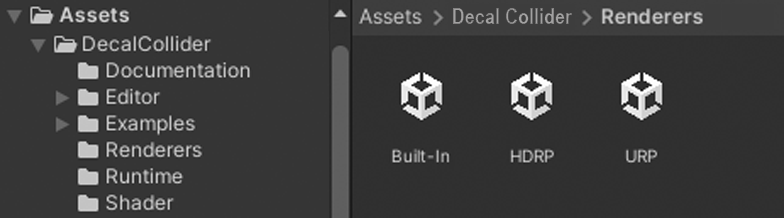
* Go to: `DecalCollider/Renderers/`
* Open the folder that matches your project (**Built-in**, **URP**, or **HDRP**).
* **Double-click** the installer/import file inside → **Import**.
* If you switch pipelines later, re-import the matching variant here.\
*Pink (magenta) materials = wrong or missing variant.*
***
## First Decal
* Add the **Decal Collider** component to any GameObject.
* In the Inspector, pick a **projection direction**, set **box size**, **depth / max distance**, and choose **mesh/collider detail**.
* (Optional) Enable **Alpha Mask** when your decal texture has transparency so empty pixels are trimmed from the mesh and collider.
* Use scene handles to **move/rotate/scale** the projection box until the preview fits.
* Press **Play** (or build) — the **decal mesh** and **collider** are generated/updated automatically.