> For the complete documentation index, see [llms.txt](https://occlusionn.gitbook.io/docs/llms.txt). Markdown versions of documentation pages are available by appending `.md` to page URLs; this page is available as [Markdown](https://occlusionn.gitbook.io/docs/documentation/debug-filter/quickstart.md).
# Quickstart
This guide explains what Debug Filter is, how to install it, and how to begin scanning and organizing your project’s debug logs inside the Unity Editor.
## Install from Asset Manager
* Open **Unity → Window → Package Manager → My Assets**.
* Find **Debug Filter** → **Download** → **Import**.
* You’ll see the `DebugFilter/` folder in your project.
{% hint style="info" %}
Want to learn about package manager window? Head to the [Unity's Package Manager](https://docs.unity3d.com/6000.1/Documentation/Manual/upm-ui.html) section to learn more.
{% endhint %}
***
### ⚙️ Optional: Console Toolbar Integration
When you open the Unity **Console**, you’ll see a **Filter** button next to the log counters.\
Click it to instantly open the Debug Filter panel for contextual filtering.
***
### 🔍 Scan & Filter Logs
1. **Automatic Scan**\
Debug Filter scans all C# scripts when imported or after compilation.\
You can manually refresh using the menu:\
**⋮ → Refresh**
2. **Search Field (top bar)**
* Click the 🔍 icon to open **Search Mode options**:
* All / Debug / Script / Method / Folder
* Filter by log type: Log / Warning / Error / Assert
* Additional filters: **Only Active**, **Only Inactive**, or **Only Changed**
3. **Folder View**
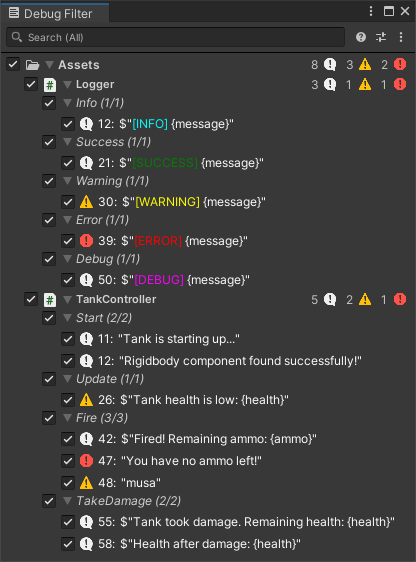
* Scripts are grouped by **Folders**, **Scripts**, and **Methods**.
* Click a folder or script to expand and see individual debug lines.
* Toggle each checkbox to enable/disable logs.
***
### 🪟 Open the Debug Filter Window
* Click **Filter** in the **Console toolbar** to open the popup directly.
You’ll see the **Debug Filter** window, showing all detected `Debug.Log`, `Warning`, `Error`, and `Assert` calls across your project.
***
### 🧹 Clean Up Debugs
You can safely delete or reset debug lines directly from the panel:
| Action | Description |
| ----------------------- | ------------------------------------------------------------ |
| 🗑️ Delete Single | Right-click on a debug → **Delete** |
| 🧩 Delete All in Script | Right-click a script → **Delete All Debugs** |
| 📁 Delete Folder Debugs | Right-click a folder → **Delete All Debugs** |
| ♻️ Reset Changes | Reverts all modified states and types to defaults |
| ⏪ Undo Support | All actions can be undone (Ctrl + Z) via Unity’s Undo system |
> ✨ Cleanup edits the script lines directly. Each deletion or reset is fully undoable.
***
### 💾 Save & Restore State
Debug Filter automatically saves your layout, filters, and visibility:
* Hidden scripts are remembered between sessions (via **EditorPrefs**).
* Filter profiles and window size are persisted automatically.
* Supports **Unity Preset** integration for sharing configurations.